
Asking clients for a review
Settings then Reminder Settings has Ask clients for a review: a text or email sent a set number of hours after an appointment, pointing clients to your Google review page, your Facebook page, your PetDesk testimonials, or any mix. Messages go out between 9am and 8pm, at most once per client in the gap you choose, never to clients who opted out of marketing, and you can switch it off for a service in Settings then Services. Clients who have left a PetDesk testimonial are skipped unless you untick that setting; for a Google or Facebook review, tick Don't ask for reviews on the client's record. Included on paid plans.
PetDesk can ask your clients for a review a set number of hours after their appointment. It sends the request the same way as your reminders: by text message (WhatsApp where the client has it, otherwise SMS), or by email if that's how you contact clients. You choose where the review goes: your Google review page, your Facebook page, your own PetDesk testimonials, or any mix of the three. Review requests are included on paid plans.
1. Switch it on and choose when to ask
Go to Settings → Reminder Settings and find Ask clients for a review at the bottom. Switch it on, then fill in:
- When to send: how many hours after the appointment ends. Then choose unless it was cancelled to ask after every appointment that wasn't cancelled, or once I've marked it completed to ask only after appointments you've marked Completed.
- How often: the most a client is asked, for example no more than once every 30 days. A client who comes every week isn't asked every week. Underneath, Don't ask clients who've already left a PetDesk testimonial is ticked to start with.
- Where to send them: paste your Google review link, your Facebook page link, tick Your PetDesk testimonials, or any combination. Fill in at least one, or nothing is sent.
Click Save Changes. Messages only go out between 9am and 8pm, so one that falls due overnight waits until 9am.
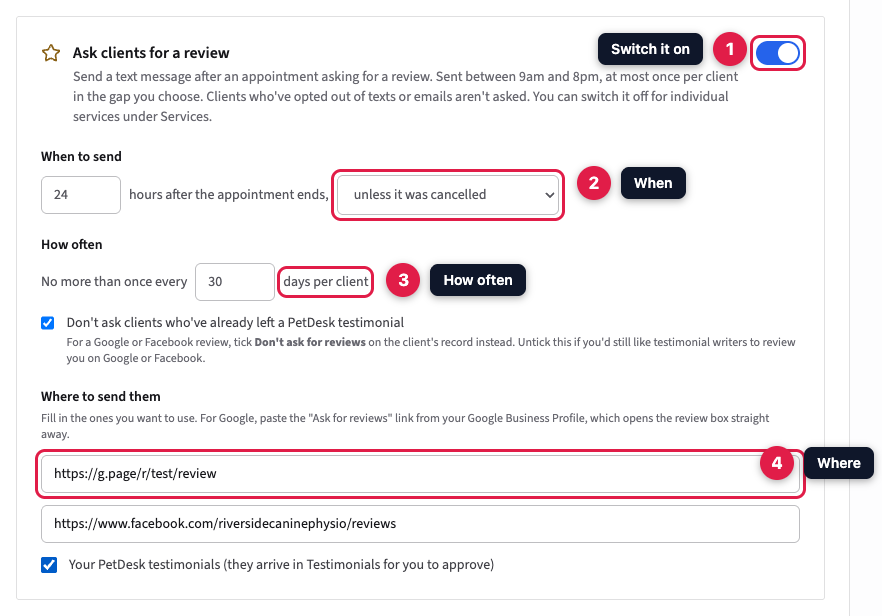
Which Google link? In your Google Business Profile, choose Ask for reviews and copy the link it gives you, which usually starts https://g.page/r/. That link opens the review box straight away. A link to your Google Maps listing makes clients hunt for the review button.
2. Turn it off for particular services
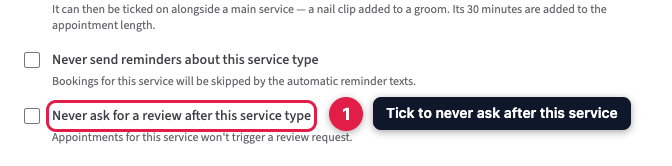
Some appointments aren't the moment to ask, such as a free taster session or a difficult visit. Go to Settings → Services & Booking Types, click the pencil next to the service, tick Never ask for a review after this service type and save.
3. What your client sees
The text reads like this: "Riverside Canine Physio: Thanks for bringing Biscuit in. We'd love a review:" followed by a link. An email says the same in a fuller message with a Leave a review button.
- If Google or Facebook is your only choice, the link goes straight to that page.
- Otherwise, the link signs the client in to your customer portal without a password and opens a review page for that appointment. It shows a button for each of your Google and Facebook pages, then the form for a PetDesk testimonial with a star rating.
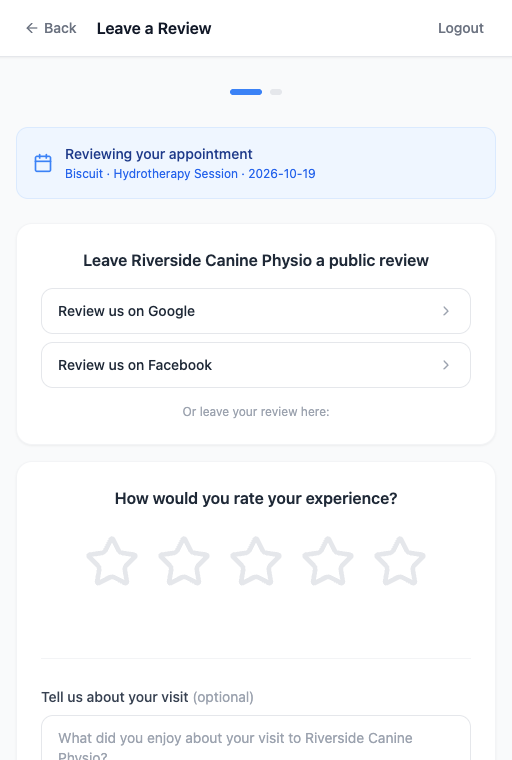
Reviews written on Google or Facebook go straight there; PetDesk can't fill them in or see them. Testimonials written in PetDesk arrive in Settings → Testimonials, unpublished, for you to approve before they appear on your website.
4. Clients who've already reviewed you
PetDesk knows when a client has left you a PetDesk testimonial, published or private, and while Don't ask clients who've already left a PetDesk testimonial is ticked, they aren't asked again. Untick it if you'd still like those clients to review you on Google or Facebook.
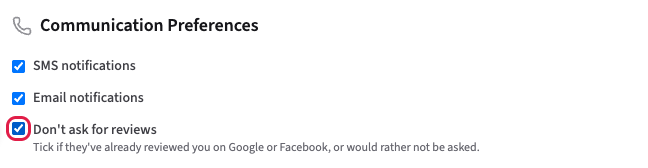
PetDesk can't see reviews left on Google or Facebook. When you know a client has reviewed you there, or they'd rather not be asked, open the client, click Edit Client, tick Don't ask for reviews under Communication Preferences and click Save Changes. Their record then shows Review Requests: Don't ask. Unlike unticking SMS or email notifications, this doesn't stop any of your other messages to them.
Who isn't asked
- Clients who have opted out of marketing texts or marketing emails. A review request counts as marketing, unlike an appointment reminder.
- Clients who were asked within your How often gap, whichever pet or appointment it was for.
- Clients marked Don't ask for reviews on their record, and, while the setting is ticked, clients who have left a PetDesk testimonial.
- Cancelled appointments, and services marked Never ask for a review.
- Appointments from before you switched it on. Only appointments that fall due from then on are asked about.
Two pets seen together get one message, not two. Texts count towards your monthly text allowance like any other message, and any that can't be sent appear on Messages Not Sent.
Ask everyone, not just clients you think were happy. Google doesn't allow businesses to send only happy customers to leave reviews, and can remove reviews it thinks were gathered that way. That's why the Google and Facebook buttons show to every client, whatever star rating they give.