Linking an animal to its vet
Open the animal's record, click Edit Animal, choose the practice under Assigned Vet and click Save Changes; the practice can then see that animal in its vet portal. When an owner types in a practice you haven't added, the record shows it in quotes with a Create this vet practice link, which adds the practice, links the animal and invites the practice if the portal is on.
A vet practice only sees the animals you link to it. Each animal can have one vet practice, set on the animal's record. With the vet portal on, the animal's consent status appears on its record as soon as it's linked.
1. Choose the animal's vet
Open the animal's record and click Edit Animal under Quick Actions. Under Assigned Vet (Optional), choose the practice from the list. If it isn't there, click Add new vet to add it without leaving the form. With the vet portal on, the practice is invited straight away. Then click Save Changes.

2. Check the record
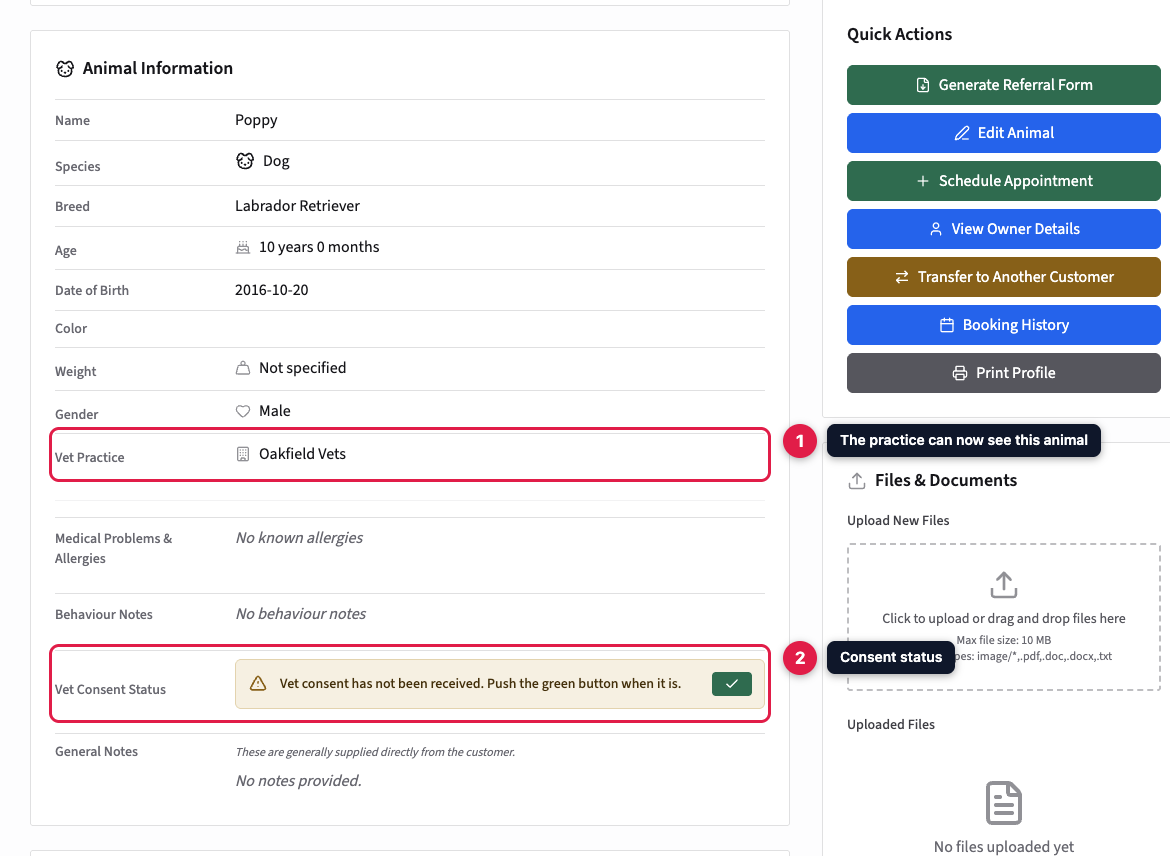
The animal's record now shows the practice under Vet Practice, and the practice can see the animal next time it looks at the vet portal. Vet Consent Status shows whether you have the vet's consent for treatment yet: see Tracking vet consent.
To move an animal to a different practice, choose the new one in the same list. The old practice stops seeing it straight away. Choose No assigned vet to unlink it altogether.
When an owner names a practice you haven't added
When owners add a pet in the customer portal, they're asked which vet practice it attends. They pick from your practices, or choose Other (not listed) and type the name. A practice they pick from the list is linked straight away. A name they type in appears on the animal's record in quotes, marked "Not in system", with a Create this vet practice link.

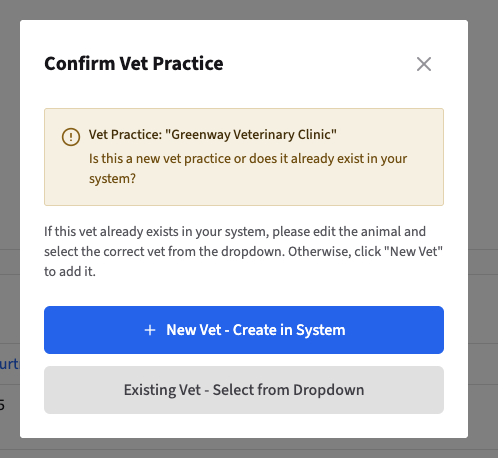
Click it, and PetDesk asks whether it's a new practice. Owners don't always use a practice's proper name, so check your list first:
- New Vet - Create in System opens the Add Vet Practice form with the name filled in. Add the practice's email address and save. The practice is created, linked to this animal, and invited if the vet portal is on.
- Existing Vet - Select from Dropdown is for a practice you already have under another name. Edit the animal and choose it from the list instead.