
Removing or restoring a vet's access
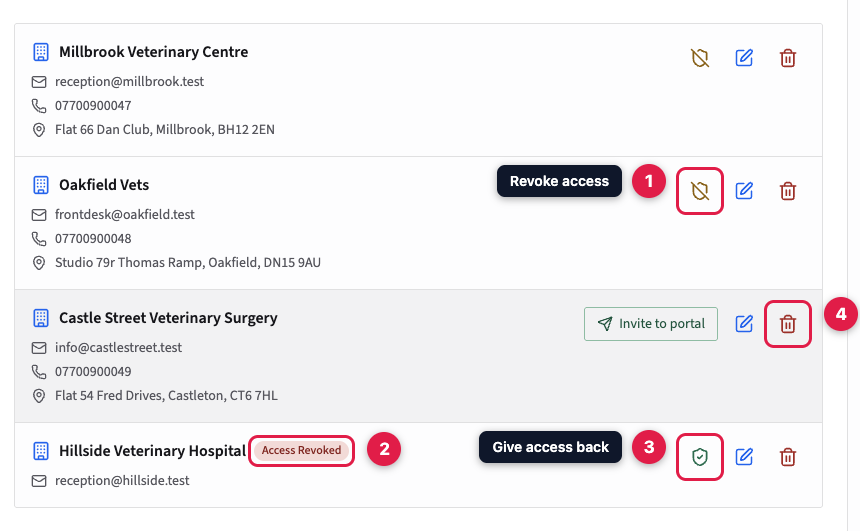
In Settings, then Vet Management, the shield button on a practice revokes its access at once, while keeping its animals and consents; the green shield gives it back. The bin icon deletes the practice permanently and leaves its animals with no vet. Disable Vet Portal, or moving to the free plan, shuts out every practice until the portal is back on.
You can stop a vet practice logging in to your vet portal at any time, and give it access back later. Or you can delete the practice altogether. Both are in Settings, then Vet Management.
Revoking and restoring access
Each practice with a login has a shield button. Click it to revoke the practice's access. The row is labelled Access Revoked, and the practice is shut out at once, even if it's logged in. Everything else stays as it was: the practice, its linked animals and its consents. To give access back, click the green shield on the same row.
A practice that works with other PetDesk businesses keeps its access to them. It just won't see yours when it logs in. If yours was its only one, it's told it isn't linked to any PetDesk businesses.
Deleting a practice
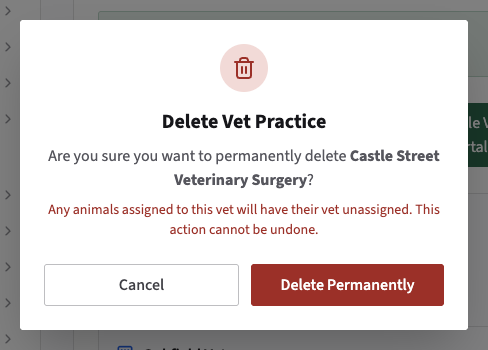
Click the bin icon on the practice's row, then Delete Permanently. This can't be undone. The practice loses its access, and every animal linked to it is left with no vet. Referrals it sent stay on file. If you only want to stop a practice logging in, revoke its access instead.
Turning off the whole portal
To stop every practice at once, click Disable Vet Portal at the top of Vet Management. Moving to the free plan has the same effect. Switching the portal back on, or upgrading, gives every practice its access back, apart from any you've revoked.