
Your plan, billing and SMS allowance
Manage Subscription shows your plan, cost, billing period and next charge, plus your SMS allowance for the period. Booking reminders, confirmations and notifications count towards that allowance; customer sign-up codes and password resets are always free. When it runs out, texts stop sending rather than costing you money — including appointment reminders.
Your plan, what it includes and your billing all live on one page. Click your account area and choose Manage Subscription, or go to /app/admin/subscription directly. Only administrators can see it.
Your current plan
The first panel shows which plan you're on, what it costs a month, whether it's active, your current billing period and when you'll next be charged. Three buttons sit alongside it: Change Plan, Cancel Subscription and Update Payment Method.
Your SMS allowance
Underneath is the panel most worth checking: how many text messages you've used this period against how many your plan includes, with a bar showing where you are and the date it resets.
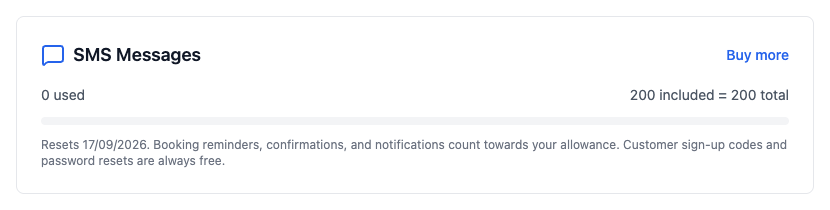
- Booking reminders, confirmations and notifications all count towards it.
- Customer sign-up codes and password resets are always free and never count, whatever your plan.
- The allowance resets on the date shown — it doesn't roll over.
Running out
When the allowance is gone, texts stop sending rather than silently costing you money. That includes appointment reminders, so it's worth glancing at this page occasionally rather than finding out through a week of no-shows. The Buy more link adds extra credits without changing your plan.
Billing history
Every payment you've made is listed at the bottom of the page. It's the quickest place to check what you were charged and when, without having to ask us.
Changing plan
Change Plan shows what's available and what each one includes. Moving up takes effect straight away. If you're weighing one up, the SMS allowance and whether reports are included are usually the two differences that actually matter day to day.
Cancelling
Cancelling stops the subscription renewing — it doesn't delete anything, and you keep access until the end of the period you've already paid for. If you're leaving, take a copy of your data first from Settings then Backups & Exports.