
Cancelling a booking
Cancel Booking is the red button at the bottom of Quick Actions on the booking. A cancelled booking stays on the record rather than disappearing. If it was prepaid, or holds a deposit the customer has paid, you must choose what happens to the money — refund it, move it to their credit, or forfeit it — and whichever you pick is recorded against the booking. On a multi-pet visit, cancelling one pet leaves the others alone and the deposit moves to a pet still coming in.
Open the appointment from the diary and look at the Quick Actions panel down the right-hand side. Cancel Booking is the red one at the bottom.
1. Find the button
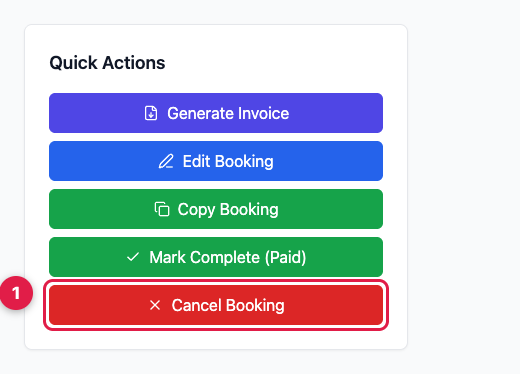
It's greyed out if the booking is already cancelled or already completed — there's nothing to cancel in either case.
2. Confirm
You're asked whether you're sure. Say yes and the booking is marked cancelled. It doesn't vanish — it stays on the animal's history and on your reports, marked as cancelled, which is what you want when someone asks three months later what happened.
If there's money on the booking
A booking that's been paid for — either prepaid in full, or holding a deposit the customer has already paid — can't just be cancelled, because the money has to go somewhere. Instead of the usual confirmation you get three choices, and you have to pick one:
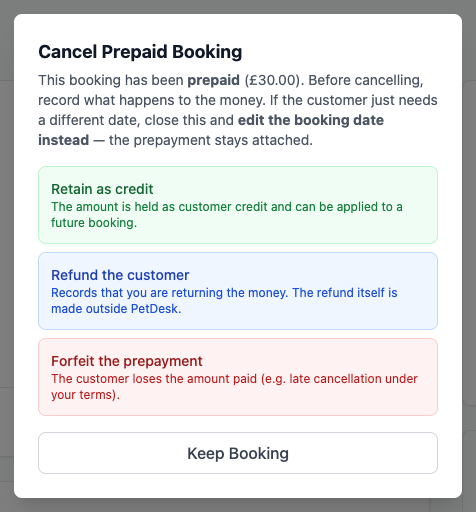
- Refund — the money goes back to the customer.
- Move to credit — it sits on their account and comes off their next booking. Usually the friendliest option, and the one most customers prefer.
- Forfeit — you keep it. For late cancellations, if that's your policy and you've told them about it.
Whichever you pick is recorded against the booking, so there's an answer if it's ever queried.
You'll now see this on ordinary deposit-paid bookings too, not just ones marked prepaid. It isn't a new charge or a new step for the customer — it's PetDesk making you say what happened to their £20 rather than quietly leaving it attached to an appointment that isn't happening.
Cancelling one pet of a visit
If the booking covers several animals, cancelling asks whether you mean the whole visit or just that one pet, and tells you which it's about to do. Cancelling one leaves the others exactly as they were.
If the pet you're cancelling was holding the deposit and another animal is still coming in, PetDesk moves the deposit across to them and doesn't ask you anything — the visit is still happening, so the money still has a home. You're only asked to choose when there's nobody left to move it to: a single-pet booking, the last pet on a visit, or cancelling the whole visit at once.
When a customer asks to cancel
If you've allowed it under Settings then Customer Portal, customers can submit a cancellation request rather than cancelling outright. Those appear on your dashboard for you to approve or decline, the same way pending booking requests do. With it switched off, customers are told to contact you instead.
Cancelling versus deleting
Cancel, don't delete. A cancelled booking keeps the record that it existed and what happened to any money — that history is what tells you which customers repeatedly cancel at short notice, and it's what you'll want if there's ever a dispute.