
Taking a quick sale
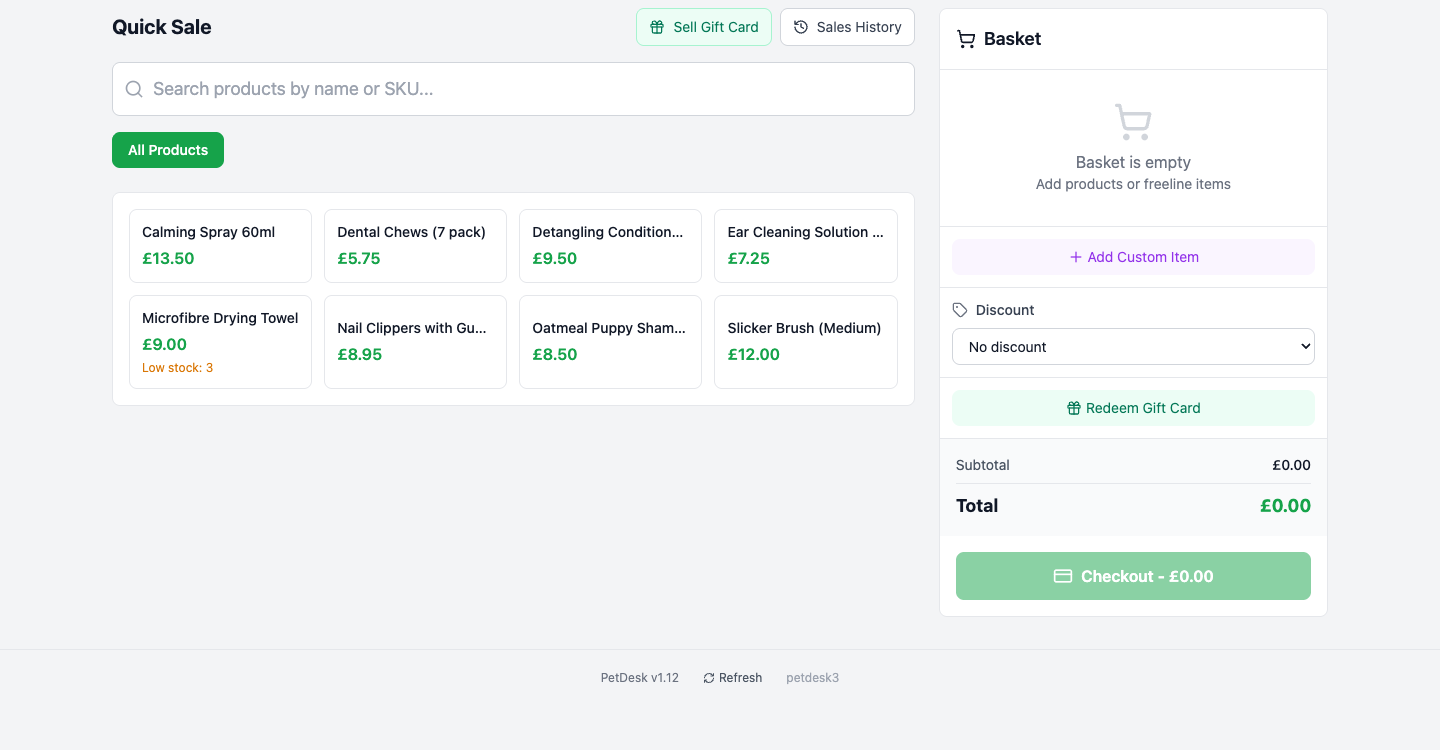
Quick Sale is the till, for anything sold without an appointment. Click products to add them to the basket, or use Add Custom Item for a one-off. Sell Gift Card means the customer is buying one; Redeem Gift Card means they are paying with one. Stock comes down automatically. If the customer has an appointment, put the products on the booking instead.
Quick Sale is the till. Use it for anything sold without an appointment attached — a bag of treats over the counter, a brush, a gift card. The green Quick Sale button sits in the top right of every page.
1. Add what they're buying
Your products appear as tiles with their prices. Click one to add it to the basket on the right, or use the search box — it matches product names and SKUs, which is quicker once you have more than a screenful. Anything running low shows a Low stock warning on its tile.
2. Selling something that isn't a product
Add Custom Item lets you type a name and a price for a one-off. Use it for anything you don't stock regularly enough to be worth setting up — you get a proper line on the receipt without cluttering your product list with something you'll sell once.
3. Discounts
The Discount dropdown applies to the whole basket. It defaults to no discount, which is what you want the overwhelming majority of the time.
4. Gift cards
Two different buttons, easily confused:
- Sell Gift Card, at the top — the customer is buying one.
- Redeem Gift Card, in the basket — the customer is paying with one they already have.
5. Check out
The subtotal and total update as you go. Click Checkout, take the money, and the sale is recorded. Stock counts come down automatically, so what's on the shelf and what PetDesk thinks is on the shelf stay in step.
Finding a sale afterwards
Sales History, next to Sell Gift Card at the top, lists everything that's gone through the till. It's where you go when somebody comes back with a receipt, or when the day's takings don't match the drawer.
Quick Sale versus a booking
If the customer has an appointment, put the products on the booking rather than through Quick Sale. They pay once, and the sale is attached to that customer and animal — so it shows up in their history and in your reports where you'd expect it. Quick Sale is for the walk-in with no appointment.