
Turning on your online shop
Settings then Online Shop has four modes: Disabled, View Only, Collection Only and Full Online Sales. View Only works on its own, but taking money needs SumUp connected, and delivery needs at least one postage option. The shop sells the same products you sell over the counter, so stock counts stay correct.
The online shop puts your retail products on your website at /shop, so customers can browse them and, if you want, buy them. Go to Settings and choose Online Shop.
1. Choose a shop mode
This one setting decides everything else. There are four:
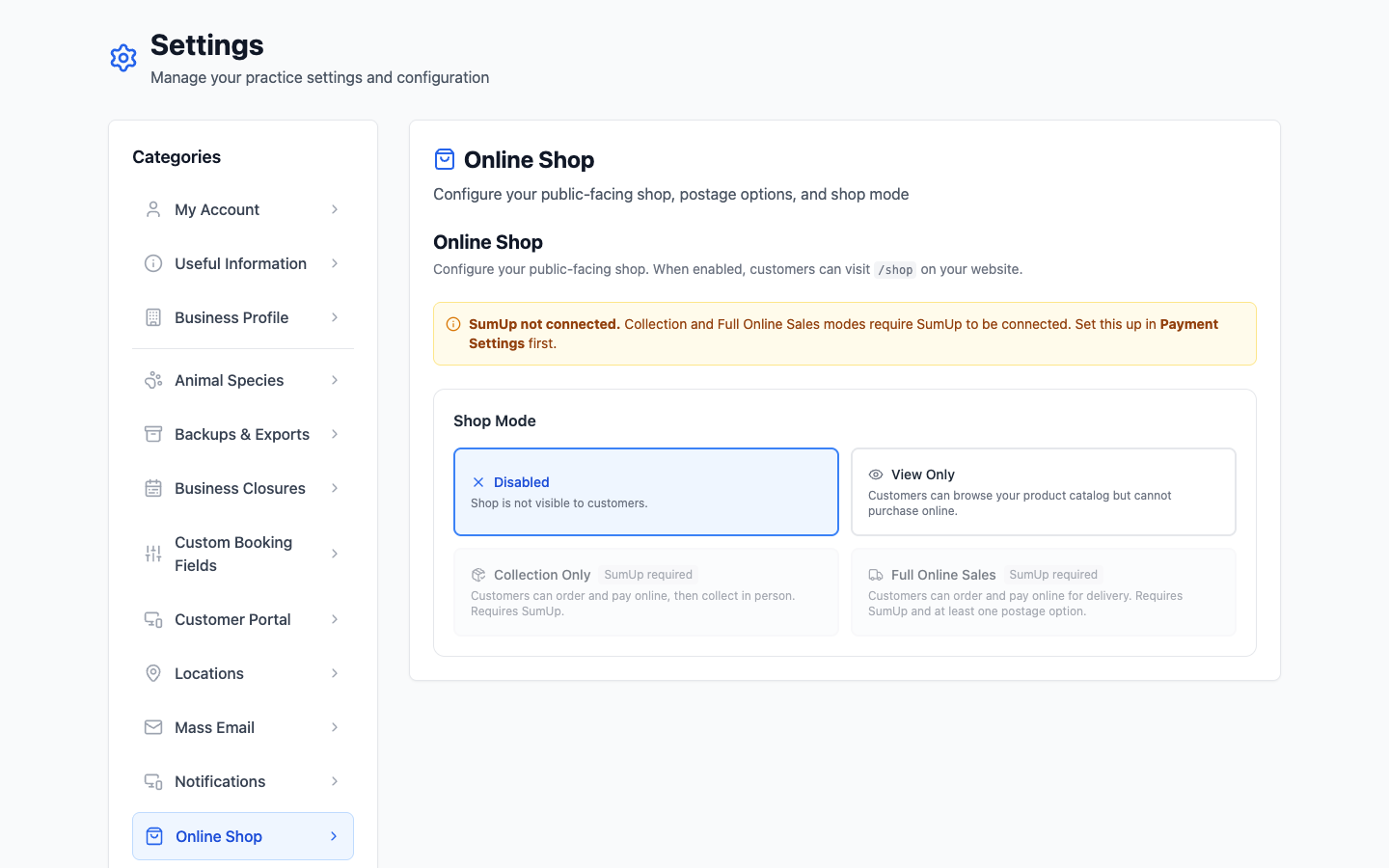
| Mode | What customers can do |
|---|---|
| Disabled | Nothing — the shop isn't visible at all. This is the starting point. |
| View Only | Browse what you sell, but not buy. Good as a shop window: people see you stock the shampoo before they ask. |
| Collection Only | Order and pay online, then collect in person. No postage to think about. |
| Full Online Sales | Order and pay online for delivery. Needs at least one postage option before it will work. |
Collection Only and Full Online Sales both need SumUp connected — there's no way to take the money otherwise. Until you've connected it under Payment Settings, those two options are greyed out and the page says so. View Only works without it.
2. Decide about out-of-stock items
As soon as the shop is anything other than Disabled, a switch appears for hiding out-of-stock items. Leave it off and they still show, marked unavailable — which tells people you normally stock it and to ask. Switch it on and they vanish until the stock count goes back up. Neither is wrong; it depends whether you'd rather field the enquiry or avoid the disappointment.
3. Postage — only for Full Online Sales
Choose Full Online Sales and a Postage Options section appears. You need at least one before anyone can check out. Each option has:
- Name and price — both required. "Royal Mail 2nd Class", £3.50.
- Description — optional, but it's where you say "3–5 working days" and save yourself an email.
- Free over — an order value above which this option costs nothing. Leave it blank and it's never free.
- Display order — the order customers see them in. Put your cheapest first.
Delivery mode also gets a switch to restrict deliveries to UK addresses only. It's on by default, and worth leaving on unless you've genuinely thought about posting a bag of treats to Belgium.
4. Save, then look at it
Click Save Changes, then visit /shop on your own website and buy something yourself. It is the only way to be sure the postage, the stock counts and the payment all behave before a customer finds out for you.
What goes in the shop
Whatever you've set up under Settings → Products and marked as visible. The shop doesn't have its own separate list — it's the same products you sell over the counter, so stock counts stay right whichever way something leaves the shelf.